If you are looking for a Twitter Like WordPress theme or if you want a WordPress theme for live blogging for a group of bloggers, then check out the P2 WordPress theme.
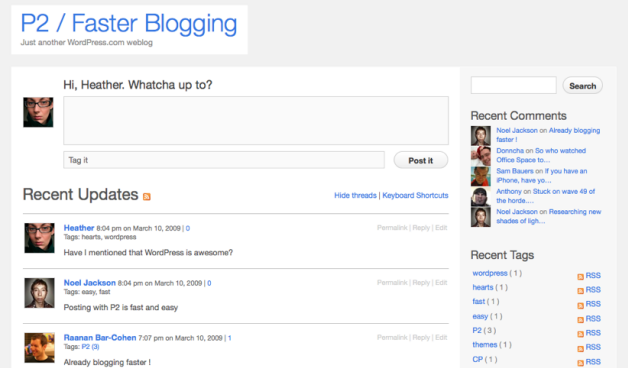
P2 is a free live blogging WordPress theme that looks just like Twitter, and is developed by Automattic, the parent company of WordPress.
P2 theme’s front page looks just like twitter, although a little bit cleaner. Posts can be created easily from front end, and while creating a post it shows suggestions for the tags based on tags already used. It displays threaded comments on the home page of the website, with live updating of comments and posts without any page refresh.
It has great moderation support too. Since its a live blogging WordPress theme, many bloggers will join the live blog. And there will be many people who will post offensive comments and posts that will be unsuitable for the community. But don’t worry, you can instantly edit any posts or comments directly from the from end of WordPress.
Other then standard features of a live group blogging WordPress theme, as described above, it supports many keyboard shortcuts, sends instant real time notifications when a new comment is posted. Check this video to see how it works great as a live blogging theme.
So, if you are need a live blogging WordPress theme, then P2 is an ideal choice for you.