WordPress is getting more popular each day, not only as a blogging platform, but as a content management system. One of the reasons for popularity of WordPress is its modular architecture. You can extend it without modifying the core code by adding plugins.
Here’s a tutorial on creating a very simple WordPress plugin to understand how the plugin system fits into the WordPress machine. Before starting to write your plugin, decide a unique name for it so that it doesn’t conflict with any existing WordPress plugin.
Start by creating a php file with the name same as your plugin file, my-first.php.
Note that you can split your plugin’s code into multiple files and folders as it gets more complex, but for our purpose, a single file will be sufficient.
If you want to submit your plugin to WordPress plugin repository, you must also include a readme file describing your plugin, no matter how simple your plugin is.
The content from this file is displayed on the plugin’s listing on WordPress plugin repository. You can see the readme file format here.
Open my-first.php file and put the standard WordPress plugin header code in it.
1 2 3 4 5 6 7 8 9 10 11 | <?php /* Plugin Name: MyFirst Plugin URI: https://www.themepremium.com Description: The Simplest WordPress Plugin. Version: 1.0 Author: Mayur Somani Author URI: http://www.agentwp.com License: GPL2 */ ?> |
Now save this file and put it in the wp-content/plugins folder in your test WordPress installation. Now go to, Plugins > Installed Plugins in your dashboard. You’ll see your plugin there with the information from the plugin header you just created.

You can even activate it but it will not do anything as we have not added any code to it yet.
Now you can add code to it depending upon your requirements. You can use WordPress hooks to modify or filter data, or you can add or fetch content from the database.
Here I will show you how to simply echo a string in your WordPress theme, using this plugin. Open my-first.php and add this code just below the plugin header.
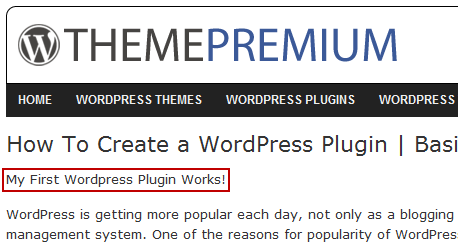
1 2 3 4 | function my_first() { echo "<p>My First Wordpress Plugin Works!</p>"; } |
Now activate this plugin if you haven’t done so already. Now edit any of the template files in your theme to add this code in it, say in single.php.
1 | <?php if(function_ exists('my_first')) { my_first(); } ?> |
If you are wondering why I didn’t simply called the my_first(); then you must check the correct way to add plugin functions in theme.
Now open the website and go to any single post, and you’ll see that the plugin works!
So you learned how to create a very basic WordPress plugin here. In future installments of this tutorial, I will cover more on creating WordPress plugins, so stay tuned.